Table of Contents
Shopify handles a lot for you. Hosting, checkout, security and a fast global CDN come as standard. What it also hands you is a set of technical decisions you did not make and cannot fully undo, and several of them work against your organic rankings.
This guide covers the most common Shopify SEO problems the platform creates by default, why each one costs you revenue rather than just rankings, and what you can realistically fix from inside Shopify. It is written for store owners and marketers who already have traffic and want to stop leaking it through structural issues.
📌 TL;DR:
- Shopify creates several paths to the same product. Canonical tags cover the duplicate content, but your internal links usually still point at the wrong URLs.
- Filters, sort parameters and tag combinations generate thousands of near identical URLs that eat crawl budget.
- App bloat, not your theme, is the biggest cause of slow Shopify stores and poor Core Web Vitals.
- Out of stock and deleted products quietly destroy rankings and backlinks every season.
- Almost all of it is fixable inside Shopify. The order you fix things in decides how fast you see results.
What Causes Shopify SEO Problems in the First Place?
Shopify is a closed, hosted platform. You control your theme, your content and your settings, but you do not control the server, the URL architecture or the way the platform generates URLs behind the scenes.
That means the issues below are structural. They are not caused by a bad theme or a careless developer, and every store on the platform starts with the same ones. There is no server config file to edit, no way to remove the URL prefixes Shopify enforces, and only limited control over redirects and crawl rules.
The upside is simple. Your competitors are running the same platform with the same defaults, and most of them have never touched any of it. Fixing these issues is one of the few advantages available to you that does not require a bigger budget.
How Does Shopify’s Duplicate URL Structure Affect Rankings?
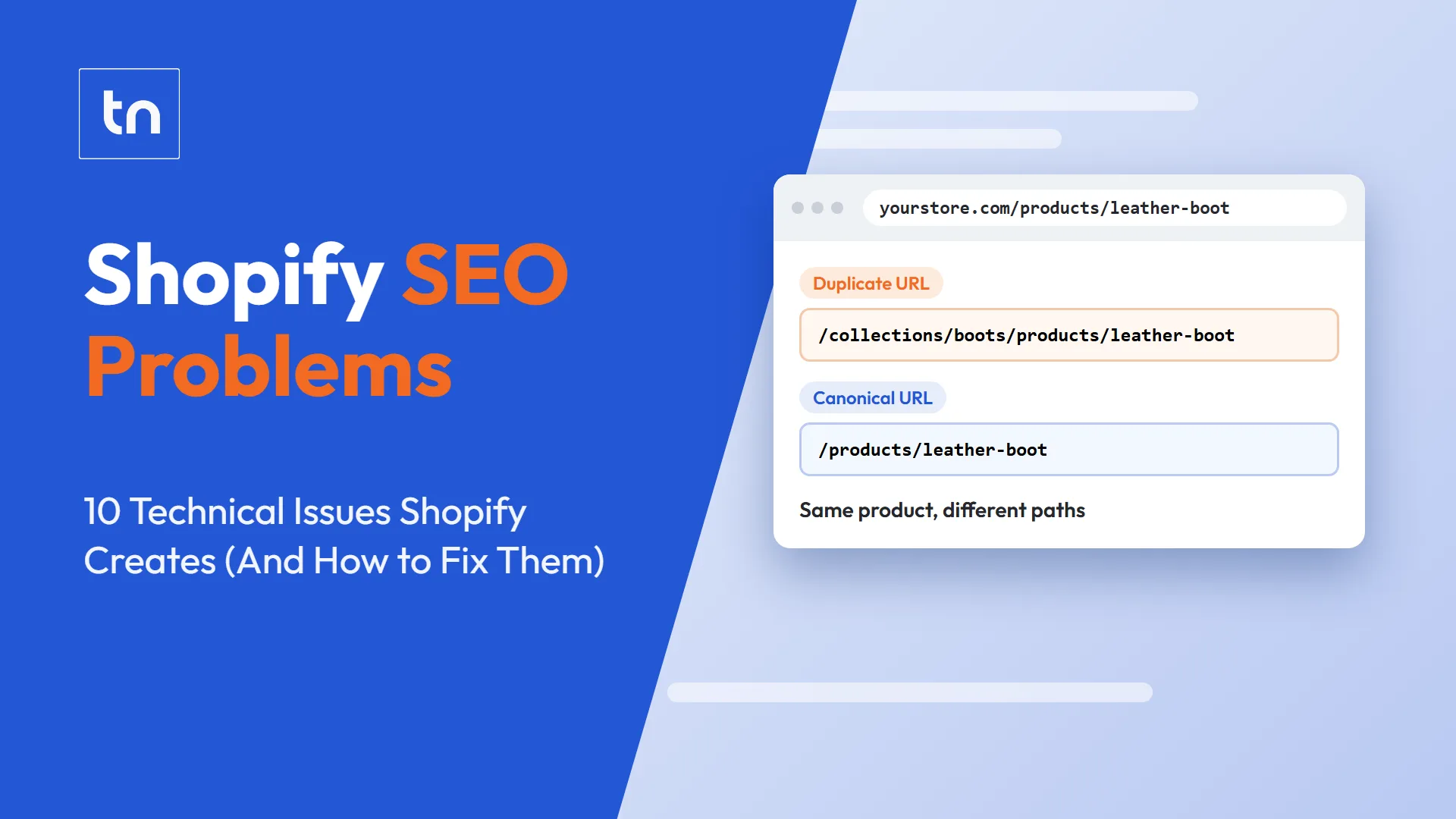
Every Shopify product is reachable at two different URLs: the clean version at /products/product-handle and a collection nested version at /collections/collection-handle/products/product-handle. Shopify sets the canonical tag to the clean version, so the duplicate content itself is handled. The internal linking underneath is not.
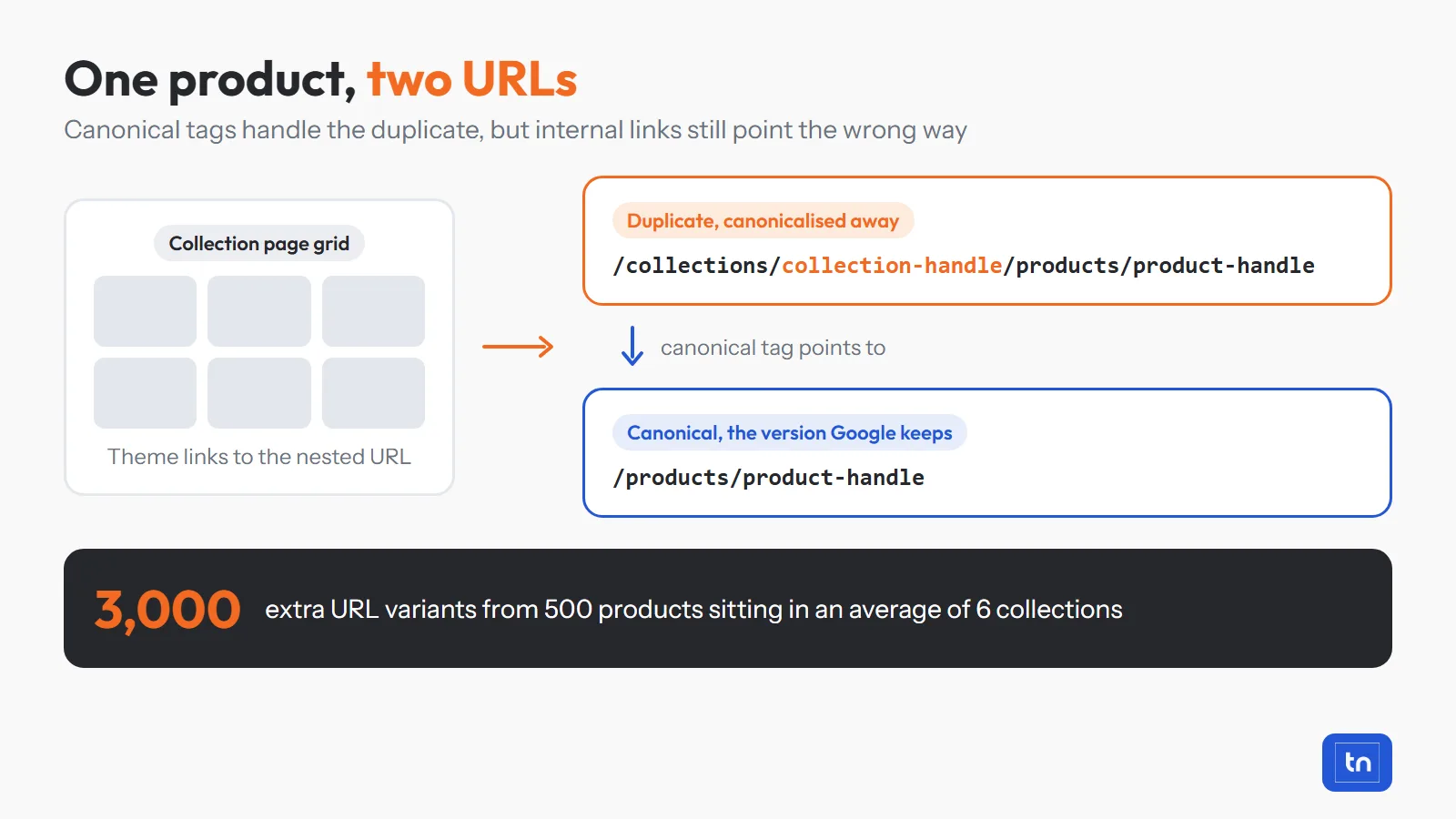
Most themes output the collection nested version in product grids. So every internal link on your site points at a URL that Google is told to ignore. Link equity flows into pages that get canonicalised away, and crawlers spend time on duplicates instead of your money pages.
The maths gets ugly quickly. A store with 500 products, each sitting in an average of six collections, produces around 3,000 extra URL variants before you count variant parameters like ?variant=123456.
The fix: edit your theme so product links output the canonical product URL rather than the collection nested one. In most themes this means removing the within: collection filter from the product URL output in your product card snippet. It is a small change with a site wide effect.
Why Do Shopify Filters and Sorting Create Crawl Waste?
Shopify appends parameters to collection URLs every time a shopper sorts or filters, and it also generates tag based URLs for filter combinations. Each one is a crawlable URL with almost identical content to the collection it came from.
A single collection with six filter options and four sort options can produce hundreds of crawlable combinations. Multiply that across 40 collections and Googlebot is spending its time on parameter soup instead of finding your new products.
You can spot this in Google Search Console. Look for large numbers of URLs sitting under Crawled, currently not indexed or Duplicate without user-selected canonical. If those URLs contain ?sort_by= or ?filter., this is your problem.
The fix: add disallow rules for sort and filter parameters in your robots.txt.liquid file, and keep the canonical pointing at the clean collection URL. Where a filter combination genuinely matches a real search term, such as “black leather ankle boots”, build it as a proper collection with its own copy and internal links. That is covered in more depth in our guide on how to optimise collection pages.
Can You Change Shopify’s Forced URL Structure?
No. The /products/, /collections/, /pages/ and /blogs/ prefixes are hard coded into the platform. You can edit the handle that comes after the prefix, and nothing else.
The practical effect is that every blog post lives at /blogs/blog-handle/post-handle, and every product sits three levels deep no matter how important it is. On its own this will not stop you ranking, but it does limit how clearly you can signal topic structure through URLs, and it makes migrations from WooCommerce or Magento a large redirect job rather than a straight swap.
The fix: use the part you do control properly. Keep handles short and descriptive, include the primary term once, and stop changing handles casually. Shopify creates an automatic redirect when you edit a handle, but your internal links keep pointing at the old URL and redirect chains build up fast.
Is Shopify’s Default Robots.txt Blocking Pages You Want Indexed?
Shopify’s default robots.txt is sensible. It blocks the cart, checkout, account pages and internal search results, which is exactly what you want. The problems start when store owners or apps edit it without understanding the knock on effects.
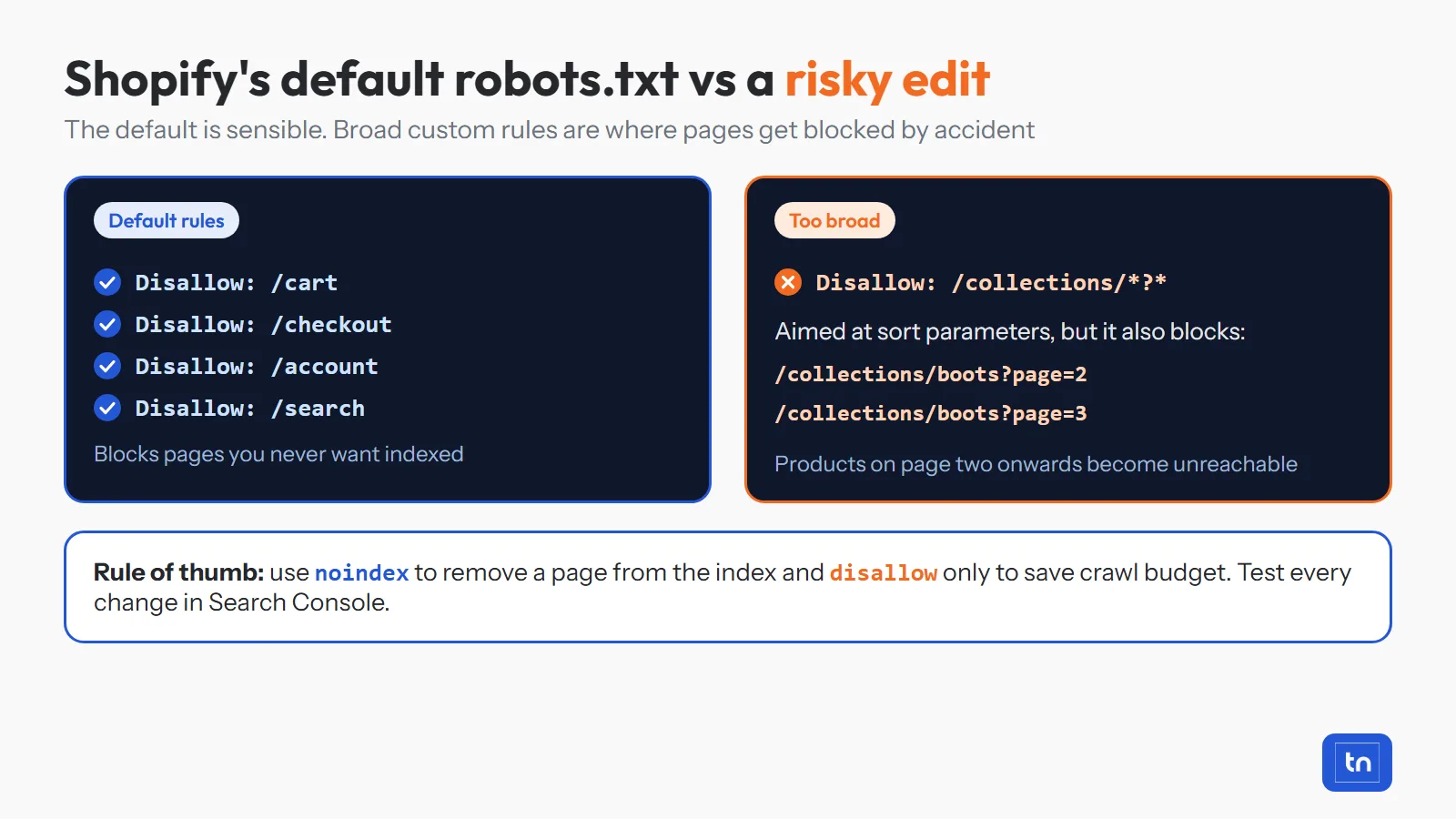
The most common mistake is a blanket disallow rule that blocks more than intended, for example a rule aimed at sort parameters that also blocks paginated collection pages. Once those are blocked, Google cannot reach the products that live on page two onwards.
The second mistake is using robots.txt when you actually want a noindex tag. Blocking a URL stops Google reading the page, but it does not remove it from the index. You end up with URLs listed in search results with no title or description attached.
The fix: test your robots.txt in Search Console before and after any change, use noindex for thin pages you want out of the index, and reserve disallow rules for saving crawl budget on parameters. If you are unsure what is currently blocked, a technical SEO audit will surface it in minutes.
Why Are Shopify Stores Slow Even on a Fast Theme?
Because most of the page weight comes from apps, not the theme. Every app you install injects its own JavaScript and CSS, and most of them load on every page whether that page uses the app or not.
Reviews, upsells, popups, live chat, wishlists, currency converters and trust badges each add their own render blocking script. Ten apps means ten sets of third party requests before your product image has finished loading. Shopify’s hosting is fast, your theme scores well in isolation, and your Largest Contentful Paint is still over four seconds.
There is a second layer to this that most stores miss. When you uninstall an app, Shopify does not always remove the code it added to your theme files. We regularly find stores running scripts for apps that were removed a year earlier.
The fix: audit your installed apps and remove any you cannot tie to revenue. Then check theme.liquid and your snippets for leftover code from apps you no longer use. Compress hero images, lazy load anything below the fold, and cut your font files down to two weights.
How Does Pagination Affect Shopify Collection Pages?
Shopify splits large collections across paginated URLs, and Google treats each page as a separate document. Products sitting on page six or later get crawled rarely and receive almost no internal link value.
It gets worse if your theme uses infinite scroll or a “load more” button that does not output a real crawlable link. In that setup, everything past the first batch of products may as well not exist as far as Google is concerned.
Paginated pages also inherit the same title tag and meta description as page one, which produces dozens of duplicate titles across the site.
The fix: make sure pagination outputs standard anchor links, keep collections to a sensible size by splitting them into sub-collections that match real search terms, and link your priority products from blog content and collection copy so they are never more than two clicks from the homepage.
What Happens to Your SEO When Products Go Out of Stock?
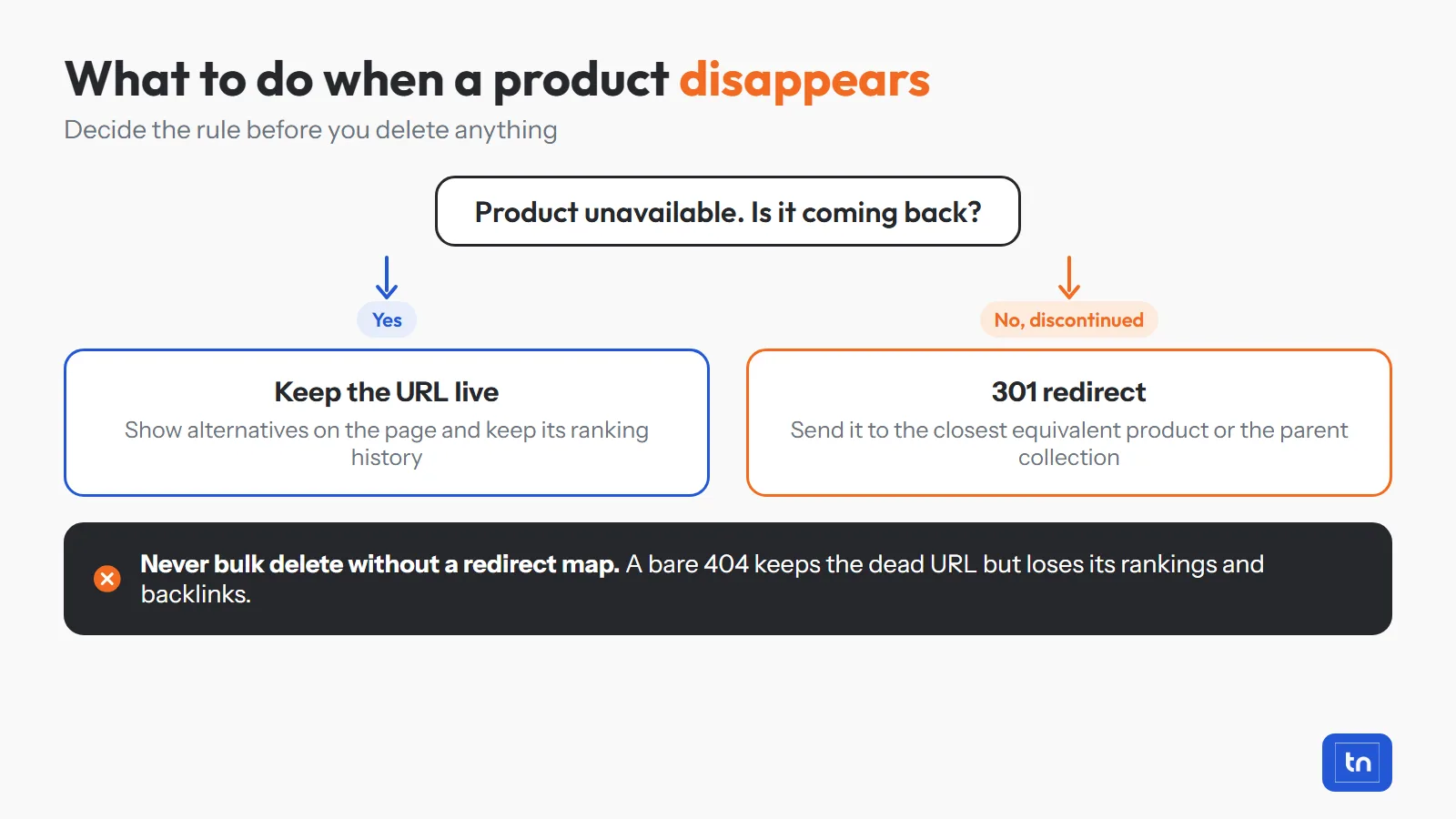
Nothing automatic happens, and that is exactly the problem. Shopify leaves an out of stock product live and returning a 200 status, and it leaves a deleted product returning a 404 with every ranking and backlink still attached to it.
Seasonal stores lose the same pages every year. A garden furniture retailer removes its summer range in October, deletes 200 product URLs, and starts the next season from zero on pages that had built up two years of ranking history.
We see the same pattern with homeware and fashion stores that bulk delete discontinued SKUs during a catalogue tidy up. The long tail traffic disappears within weeks and nobody connects the two events.
The fix: decide the rule before you delete anything. If the product is coming back, keep the URL live and show alternatives on the page. If it is discontinued for good, 301 redirect it to the closest equivalent product or to its parent collection. Never bulk delete without a redirect map.
Are Shopify’s Default Meta Titles and Descriptions Hurting You?
Yes, if you have never overwritten them. Shopify builds title tags from the product or collection name plus your store name, and it either pulls the meta description from the opening lines of your description or leaves it empty.
The result is a store full of near identical titles that describe the product but say nothing about why anyone should click. Collection pages are usually worse, because most stores never write a collection description at all, which leaves the highest intent commercial pages on the site with no copy, no keyword targeting and no reason for Google to rank them.
The fix: start with your top 20 pages by revenue rather than trying to rewrite everything. Give each one a unique title built around how buyers actually search, and a meta description written to earn the click. Then work down the catalogue. Our on-page SEO services and SEO content writing services cover this at scale if you do not have the internal resource.
If you want to know which of these issues is actually costing you money on your store, get a free SEO audit and we will show you the priority order.
Does Shopify’s Blog Structure Limit Your Content SEO?
It limits how you organise content rather than how well individual posts perform. Shopify blogs support tags but not real hierarchical categories, and every post sits under a blog handle you cannot remove from the URL.
That makes topic clusters harder to build. There is no native way to group ten posts about running shoes under a parent hub, no author archives by default, and tag pages that are usually thin, indexable and duplicated against each other.
The fix: use one blog handle rather than several, build your clusters manually with internal links from posts back to the collections they support, and noindex tag archives unless a tag page has genuine search demand behind it. Content is also where most stores earn their links, so it is worth pairing with a proper link building strategy.
Do Shopify Markets Cause International SEO Problems?
Shopify Markets makes selling internationally easy and makes international SEO harder. Each market duplicates your entire catalogue across a new subfolder or domain, often with identical English content on both.
Shopify does output hreflang tags, but coverage is often incomplete on custom pages and blog content, and stores frequently spin up markets for currency display alone. That leaves you with three versions of every product page differing only by the currency symbol.
The fix: only create markets for regions you genuinely sell and ship to, check that hreflang return tags are reciprocal, and differentiate each market with region specific delivery, sizing and pricing information. If you only need a currency switch, use the currency setting rather than a full market.
How Do You Fix Shopify SEO Problems in the Right Order?
Fix them in the order Google encounters them: indexation first, then crawl efficiency, then speed, then on-page, then content. Working out of order means you spend weeks writing copy for pages Google is not crawling properly.
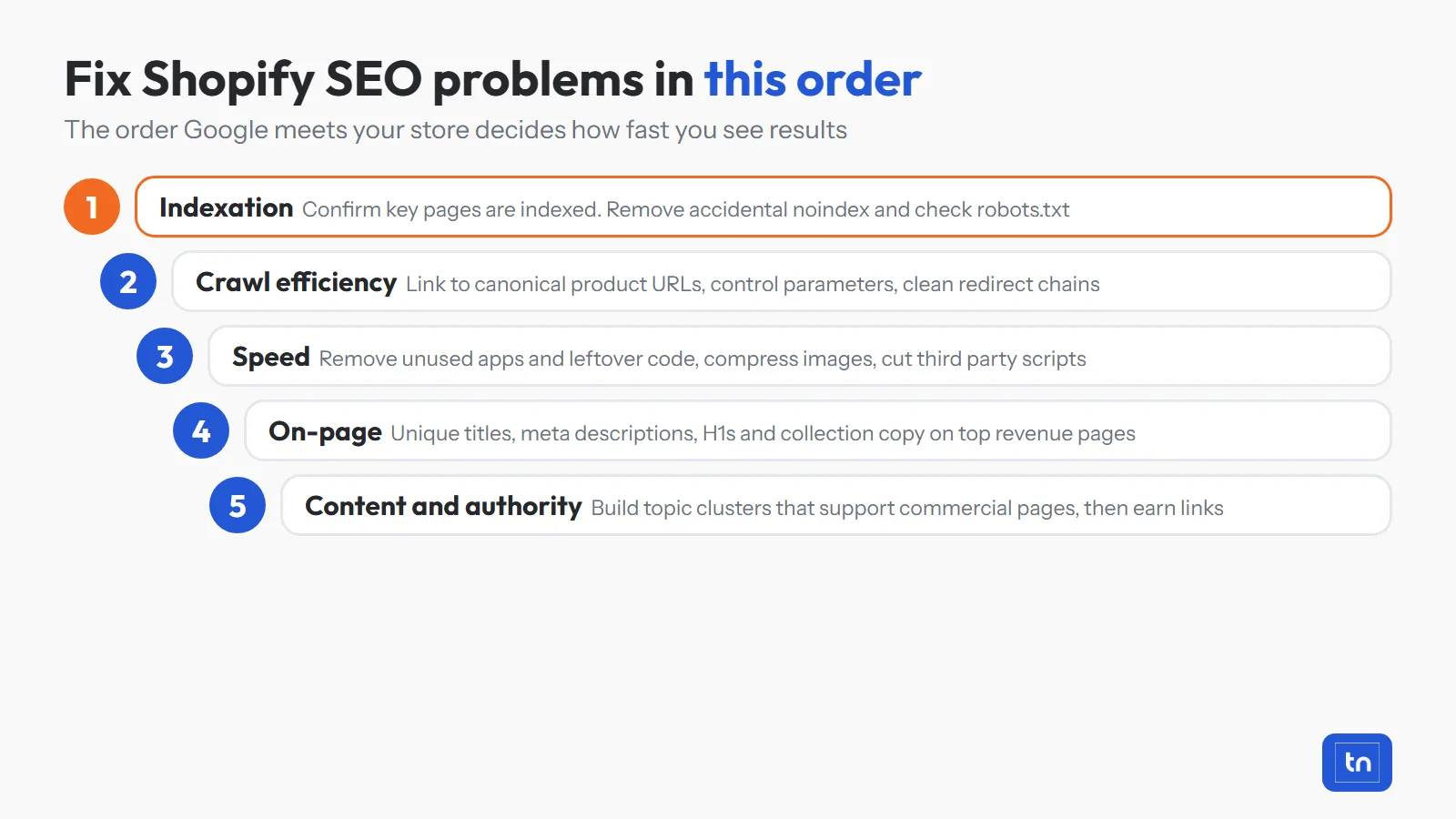
- Indexation. Confirm in Search Console that your products, collections and key pages are indexed. Remove accidental noindex tags and check robots.txt.
- Crawl efficiency. Fix internal links to canonical product URLs, control filter and sort parameters, and clean up redirect chains.
- Speed. Remove unused apps and their leftover code, compress images and reduce third party scripts. Speed isn’t a ranking factor but it can impact organic performance indirectly by impacting user experience and lowering average engagement on page.
- On-page. Unique titles, meta descriptions, H1s and collection copy on your top revenue pages first.
- Content and authority. Build topic clusters that support your commercial pages, then earn links to them.
This is the sequence we use on every store we work with. You can see how it played out on a real store in our Shopify SEO recovery case study, where fixing the technical foundation first is what made the content work pay off.
So Is Shopify Actually Holding Your Store Back?
Shopify gives you a fast, secure store that handles the hard parts of ecommerce. It also ships with duplicate URLs, crawl waste, app bloat and empty meta data that nobody in your business was ever told to fix. Left alone, those Shopify SEO problems quietly cap how much organic revenue the store can produce.
None of it requires replatforming. It requires someone going through the store in the right order and fixing what the platform decided for you. Do that, and your store stops competing on ad spend alone and starts earning traffic that keeps arriving after the budget stops.
If you want a second pair of eyes on your store, book a free consultation with Adrian or take a look at how our Shopify SEO agency approach works for ecommerce brands that want revenue, not vanity rankings.
Frequently Asked Questions About Shopify SEO Problems
No. Shopify gives you fast hosting, a global CDN, clean HTML, automatic canonical tags and SSL as standard, which is more than many platforms manage. The issue is that it also ships with defaults that create duplicate URLs, crawl waste and empty meta data. Stores that underperform on Shopify are almost always running those defaults untouched.
Only partly. Shopify sets a canonical tag on collection nested product URLs pointing back to the clean product URL, which stops the duplicate content being indexed. It does not fix the internal links in your theme that still point at those duplicate URLs, and it does nothing about the parameter URLs created by filters and sorting.
Yes. Shopify allows you to edit robots.txt through the robots.txt.liquid theme file, so you can add or remove crawl rules. Be careful with broad rules, because a disallow aimed at sort parameters can easily block paginated collection pages as well. Always test the result in Google Search Console.
They can. Most apps inject JavaScript and CSS into every page whether that page uses the app or not, which slows down load times and damages Core Web Vitals. Uninstalling an app does not always remove the code it added to your theme, so leftover scripts often keep firing months later.
Indexation and crawl improvements usually show in Google Search Console within two to six weeks. Ranking and revenue gains typically follow over three to six months, depending on how competitive your categories are and how much authority the domain already has.
Some fixes need theme file edits, such as changing product link output or updating robots.txt.liquid. Many others, including meta data, collection copy, redirects and app clean up, can be handled from the Shopify admin. If you are not sure which issues are costing you the most, book a free SEO audit with Studio Upstream and we will show you exactly where your store stands.